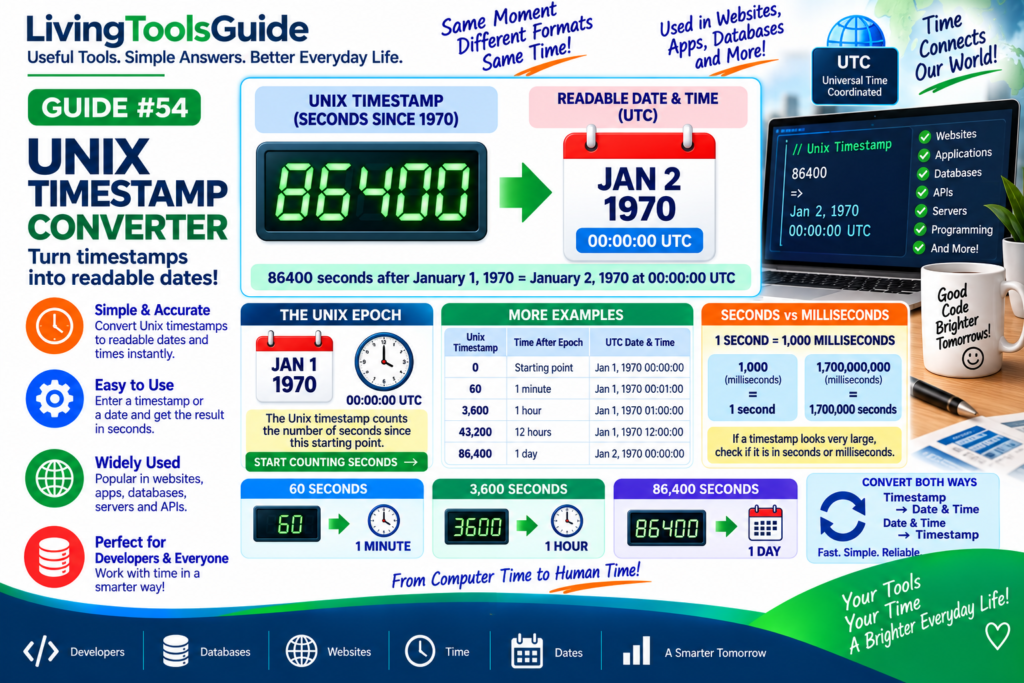
Computers often store dates and times differently from the familiar formats we use every day. Instead of writing a date such as September 10, 2026, many computer systems represent time as a single number called a Unix timestamp.
Unix timestamps are widely used in websites, databases, APIs, applications, servers, and programming.
A Unix Timestamp Converter makes it easy to convert a Unix timestamp into a readable date and time—or convert a date and time back into a timestamp.
What Is a Unix Timestamp?
A Unix timestamp represents the amount of time that has passed since:
January 1, 1970 at 00:00:00 UTC
This starting point is commonly called the:
Unix Epoch
Standard Unix timestamps are usually expressed as the number of seconds since the Unix Epoch.
For example:
0 = January 1, 1970, 00:00:00 UTC
As time passes, the timestamp number increases.
For an authoritative reference on Unix time and standardized timestamps, see the NIST guidance on time and frequency.
How Does a Unix Timestamp Work?
Think of the Unix Epoch as a starting point:
Unix Epoch → Count Seconds → Current Date & Time
For example:
60
means 60 seconds after the Unix Epoch.
Therefore:
60 → January 1, 1970, 00:01:00 UTC
Similarly:
3600
represents one hour after the Unix Epoch:
3600 → January 1, 1970, 01:00:00 UTC
Unix Timestamp Formula
The basic relationship is:
Unix Timestamp = Seconds Since January 1, 1970 00:00:00 UTC
To convert seconds into larger units:
60 seconds = 1 minute
3,600 seconds = 1 hour
86,400 seconds = 1 day
This makes it easier to understand how timestamp values represent elapsed time.
Example 1 — 60 Seconds
Unix timestamp:
60
Since:
60 seconds = 1 minute
the corresponding time is:
January 1, 1970 at 00:01:00 UTC
Example 2 — 3,600 Seconds
Unix timestamp:
3600
Since:
3,600 seconds = 1 hour
the corresponding time is:
January 1, 1970 at 01:00:00 UTC
Example 3 — 86,400 Seconds
Unix timestamp:
86400
Since:
86,400 seconds = 24 hours
this represents exactly one day after the Unix Epoch.
Therefore:
86400 → January 2, 1970 at 00:00:00 UTC
Quick Unix Timestamp Examples
| Unix Timestamp | Time After Epoch | UTC Date & Time |
|---|---|---|
| 0 | Starting point | Jan 1, 1970 00:00:00 |
| 60 | 1 minute | Jan 1, 1970 00:01:00 |
| 3,600 | 1 hour | Jan 1, 1970 01:00:00 |
| 43,200 | 12 hours | Jan 1, 1970 12:00:00 |
| 86,400 | 1 day | Jan 2, 1970 00:00:00 |
Seconds vs Milliseconds
This is an important difference when working with timestamps.
A traditional Unix timestamp usually counts:
Seconds
However, some systems use:
Milliseconds
There are:
1,000 milliseconds = 1 second
For example:
1,000 Unix milliseconds = 1 second after the Epoch
So when a timestamp looks much longer than expected, check whether the system is using seconds or milliseconds.
Why Is UTC Important?
Unix timestamps are based on UTC rather than a particular local time zone.
When a timestamp is displayed as a readable date, software can convert that UTC-based moment into a selected local time zone.
This means the same instant can appear as different clock times depending on the location.
Where Are Unix Timestamps Used?
💻 Websites and applications — storing creation and update times.
🗄️ Databases — recording when events or records occurred.
🔌 APIs — exchanging standardized date and time information.
📱 Mobile apps — managing messages, notifications and activity times.
🖥️ Servers — recording system events and logs.
👨💻 Programming — comparing and calculating dates and times.
Why Use a Unix Timestamp?
A numeric timestamp can make it convenient for computer systems to store, compare, sort, and calculate moments in time.
For example, timestamps can help determine:
Which event happened first
How much time passed between two events
When a record was created
When an action occurred
However, a large timestamp is difficult for people to read directly.
That’s where a converter becomes useful.
Why Use a Unix Timestamp Converter?
A Unix Timestamp Converter lets you quickly switch between:
Unix Timestamp → Human-Readable Date & Time
and:
Date & Time → Unix Timestamp
Instead of manually calculating seconds from 1970, the converter handles the conversion for you.
Convert Your Unix Timestamp
Enter a timestamp into our Unix Timestamp Converter to quickly convert it into a readable date and time.
You can also use the converter to turn a date and time into a Unix timestamp.