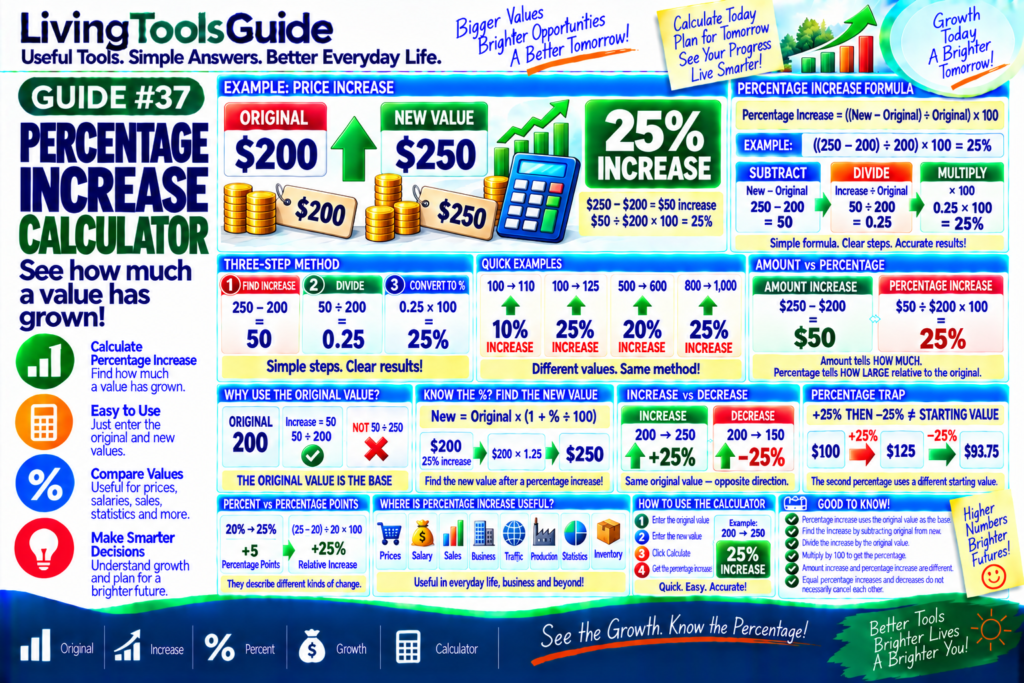
Percentage increase shows how much a value has grown compared with its original amount.
It is commonly used to measure increases in prices, salaries, sales, revenue, website traffic, populations, production, investments, and many other values.
For example, suppose a product’s price increases from $200 to $250.
The amount of increase is:
$250 − $200 = $50
Compared with the original $200:
$50 ÷ $200 × 100 = 25%
Therefore:
$200 → $250 = 25% Increase
A Percentage Increase Calculator performs these steps automatically. Enter the original value and the new higher value to quickly calculate the percentage increase.
What Is Percentage Increase?
Percentage increase measures the increase between an original value and a larger new value, expressed as a percentage of the original value.
A Percentage Increase Calculator makes it easy to compare an original value with a new value and quickly measure the percentage of growth.
The calculation has three basic steps:
1 — Find the increase
2 — Divide by the original value
3 — Multiply by 100
Example:
Original = 200
New = 250
Increase:
250 − 200 = 50
Then:
50 ÷ 200 = 0.25
Finally:
0.25 × 100 = 25%
Result:
25% Increase
Percentage Increase Calculator Formula
For an official example of how percent changes are calculated, see the U.S. Bureau of Labor Statistics guide to calculating percent changes.
Use:
Percentage Increase = ((New Value − Original Value) ÷ Original Value) × 100
Or calculate it in two stages:
Increase = New − Original
Then:
Percentage Increase = (Increase ÷ Original) × 100
Example 1 — $200 to $250
Original:
$200
New:
$250
Increase:
$250 − $200 = $50
Then:
$50 ÷ $200 × 100
Result:
25% Increase
Example 2 — 100 to 120
Original:
100
New:
120
Increase:
20
Calculation:
20 ÷ 100 × 100
Result:
20% Increase
Example 3 — 500 to 600
Original:
500
New:
600
Increase:
100
Calculation:
100 ÷ 500 × 100
Result:
20% Increase
Notice that an increase of 100 does not mean a 100% increase. The percentage depends on the original value.
Example 4 — 800 to 1,000
Original:
800
New:
1,000
Increase:
200
Calculation:
200 ÷ 800 × 100
Result:
25% Increase
Quick Percentage Increase Examples
| Original | New | Increase | % Increase |
|---|---|---|---|
| 100 | 110 | 10 | 10% |
| 100 | 125 | 25 | 25% |
| 200 | 250 | 50 | 25% |
| 400 | 500 | 100 | 25% |
| 500 | 600 | 100 | 20% |
| 800 | 1,000 | 200 | 25% |
Why Do We Divide by the Original Value?
The original value is the starting point, so percentage increase measures the change relative to that value.
Suppose:
200 → 250
The increase is:
50
To calculate the percentage:
50 ÷ 200 × 100 = 25%
We compare the increase with 200, not 250.
Therefore:
THE ORIGINAL VALUE IS THE BASE
This is one of the most important rules to remember.
Amount Increase vs Percentage Increase
These are different measurements.
Suppose a price changes:
$200 → $250
Amount Increase
$250 − $200
=
$50
Percentage Increase
$50 ÷ $200 × 100
=
25%
The $50 tells you the actual amount added.
The 25% tells you how large that increase is compared with the starting value.
How to Find a New Value After a Percentage Increase
Sometimes you already know the original value and percentage increase.
Use:
New Value = Original × (1 + Percentage ÷ 100)
For example:
Original = $200
Increase = 25%
Convert:
25% = 0.25
Then:
$200 × 1.25 = $250
Therefore:
$200 increased by 25% = $250
Example — Increase $500 by 15%
Original:
$500
Percentage increase:
15%
First calculate the increase:
$500 × 0.15 = $75
Then:
$500 + $75 = $575
Therefore:
$500 increased by 15% = $575
You can also calculate it directly:
$500 × 1.15 = $575
Percentage Increase vs Percentage Decrease
GUIDE #36 covered percentage decrease. The two calculations are closely related.
📈 Percentage Increase
Original:
200
New:
250
Result:
+25%
📉 Percentage Decrease
Original:
200
New:
150
Result:
−25%
Both calculations compare the change with the original value.
Important: +25% and −25% Don’t Cancel Out
Suppose you start with:
$100
Increase it by 25%:
$100 × 1.25 = $125
Now decrease $125 by 25%:
$125 × 0.75 = $93.75
Result:
$93.75
You do not return to $100.
Why?
Because the 25% decrease is calculated from the new starting value of $125, not the original $100.
Therefore:
+25% followed by −25% ≠ original value
Percentage Increase vs Percentage Points
These terms should not be confused.
Suppose a rate changes from:
20% → 25%
The increase is:
5 percentage points
But the relative percentage increase is:
(25 − 20) ÷ 20 × 100
=
25% Increase
So:
20% → 25%
means:
+5 percentage points
but also:
+25% relative increase
The correct description depends on what you are measuring.
Where Is Percentage Increase Useful?
Percentage increases appear throughout everyday life and business:
💰 Prices — compare rising prices.
💼 Salary — calculate pay increases.
📈 Sales — measure sales growth.
🏢 Business — compare revenue or other metrics.
🌐 Website Traffic — measure visitor growth.
🏭 Production — compare output.
📊 Statistics — analyze changing values.
📦 Inventory — measure increases in stock.
How to Use the Percentage Increase Calculator
Using your LivingToolsGuide calculator is simple:
1 — Enter the Original Value
2 — Enter the New Value
3 — Click Calculate
4 — View the Percentage Increase
Example:
Original: 200
New: 250
↓
25% INCREASE
The calculator handles the subtraction, division, and percentage conversion automatically.
Calculate Your Percentage Increase
Want to know how much a value has grown?
Use our Percentage Increase Calculator to compare an original value with a higher new value and quickly calculate the percentage increase.
Use our Percentage Increase Calculator whenever you need a quick way to measure increases in prices, costs, sales, income or other values.
👉 Use the Percentage Increase Calculator
📊 Original | 📈 Increase | % Percent | 💰 Growth | 🧮 Calculator
See the Growth. Know the Percentage!