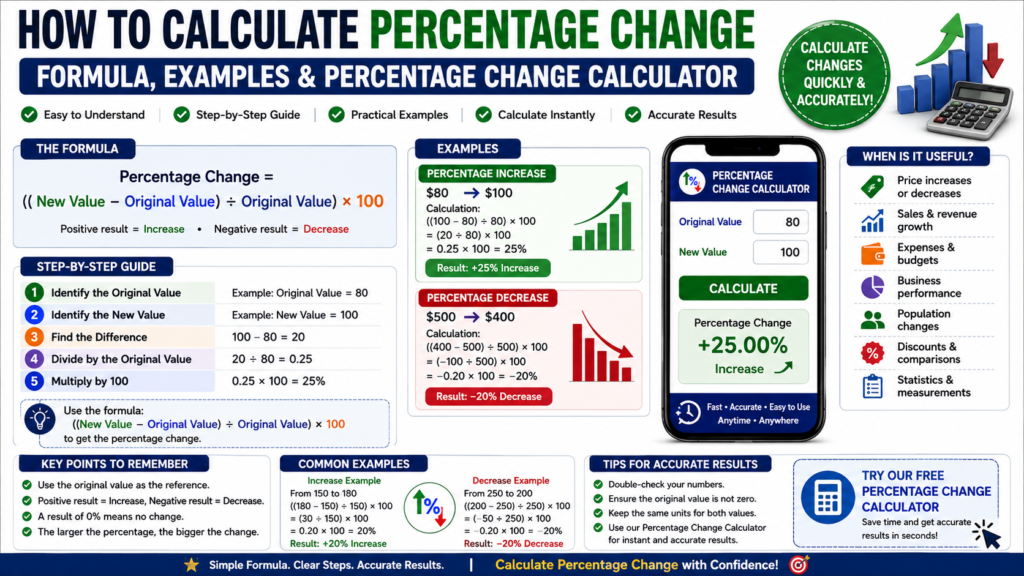
The Percentage Change Calculator helps you quickly calculate how much a value has increased or decreased as a percentage from its original value.
Percentage change is a useful way to measure how much a value has increased or decreased compared with its original value. It is commonly used for prices, sales, income, expenses, business results, measurements, and many everyday comparisons.
Once you know the original value and the new value, you can calculate percentage change with a simple formula.
What Is Percentage Change?
Percentage change shows the difference between an old value and a new value as a percentage of the original value.
A positive result generally represents an increase, while a negative result represents a decrease.
For example, if a price rises from $100 to $120, the increase is $20.
Compared with the original $100:
$20 ÷ $100 × 100 = 20%
Therefore, the percentage change is a 20% increase.
Percentage Change Formula
Use this formula:
Percentage Change = ((New Value − Original Value) ÷ Original Value) × 100
Where:
Original Value = the starting value
New Value = the final value
The result is expressed as a percentage.
For more information about percentages and percentage calculations, see the Percent reference from Wolfram MathWorld.
How to Calculate Percentage Change Step by Step
Step 1: Identify the Original Value
Start with the original or beginning value.
For example:
Original Value = 80
Step 2: Identify the New Value
Find the new or final value.
For example:
New Value = 100
Step 3: Find the Difference
Subtract the original value from the new value:
100 − 80 = 20
Step 4: Divide by the Original Value
Divide the difference by the original value:
20 ÷ 80 = 0.25
Step 5: Multiply by 100
Convert the result to a percentage:
0.25 × 100 = 25%
Therefore, the value increased by:
25%
How to Calculate Percentage Increase
When the new value is greater than the original value, the result represents a percentage increase.
For example:
Original Value = $200
New Value = $250
Find the difference:
$250 − $200 = $50
Then:
($50 ÷ $200) × 100 = 25%
Therefore, the value increased by:
25%
How to Calculate Percentage Decrease
When the new value is lower than the original value, you can describe the change as a percentage decrease.
For example:
Original Value = $500
New Value = $400
The decrease is:
$500 − $400 = $100
Then:
($100 ÷ $500) × 100 = 20%
Therefore, the value decreased by:
20%
Using the general percentage-change formula directly would produce −20%, where the negative sign indicates a decrease.
Example of Percentage Change
Suppose monthly sales increase from $1,500 to $1,800.
Use:
Percentage Change = ((New Value − Original Value) ÷ Original Value) × 100
Calculate the difference:
$1,800 − $1,500 = $300
Divide by the original value:
$300 ÷ $1,500 = 0.20
Multiply by 100:
0.20 × 100 = 20%
Therefore, monthly sales increased by:
20%
Why the Original Value Matters
A common mistake is dividing the difference by the new value instead of the original value.
Percentage change compares the amount of change with the starting value.
For example, an increase from 50 to 75 is:
((75 − 50) ÷ 50) × 100 = 50%
The original value of 50 is the reference point.
Percentage Change vs. Percentage Difference
Percentage change and percentage difference are related, but they are not always the same calculation.
Percentage change is normally used when there is a clear original value and a new value.
Percentage difference is often used when comparing two values without treating either one as the starting value.
Therefore, it is important to choose the calculation that matches what you are trying to measure.
Use Our Free Percentage Change Calculator
You can use the free Percentage Change Calculator on LivingToolsGuide to calculate increases and decreases quickly.
Enter the original value and new value, and the calculator can determine the percentage change automatically.
This is useful when working with prices, financial figures, measurements, statistics, or everyday comparisons.
Where Is Percentage Change Useful?
Percentage change is commonly useful for:
- Price increases and decreases
- Sales growth
- Revenue changes
- Expenses and budgets
- Investment values
- Population changes
- Measurements
- Business performance
- Discounts and price comparisons
- Statistical analysis
It provides an easy way to compare changes even when the original numbers are very different.
Frequently Asked Questions
What is the formula for percentage change?
Use:
Percentage Change = ((New Value − Original Value) ÷ Original Value) × 100
What does a positive percentage change mean?
A positive result normally means the new value is greater than the original value, indicating an increase.
What does a negative percentage change mean?
A negative result normally indicates that the new value is lower than the original value.
Is percentage change the same as percentage difference?
Not exactly. Percentage change uses an original value as the reference point, while percentage difference is commonly used to compare two values without designating one as the starting value.
Can the original value be zero?
The standard percentage-change formula divides by the original value. If the original value is zero, ordinary percentage change using this formula is undefined because division by zero is not possible.
Final Thoughts
Using the Percentage Change Calculator can help you verify your results and avoid mistakes when comparing old and new values.
Percentage change provides a simple way to measure how much a value has increased or decreased relative to where it started.
The main formula to remember is:
Percentage Change = ((New Value − Original Value) ÷ Original Value) × 100
For faster calculations, use the Percentage Change Calculator on LivingToolsGuide.
The Percentage Change Calculator makes it easy to check percentage increases and decreases quickly and accurately.