URL Encoder / Decoder
Encode text into a URL-safe format or decode encoded URLs back into readable text instantly.
How to Use the URL Encoder / Decoder
Select Encode to convert regular text into a URL-safe format, or select Decode to convert encoded URL text back into readable text. Enter your text, click the conversion button, then copy the result.
Table of Contents
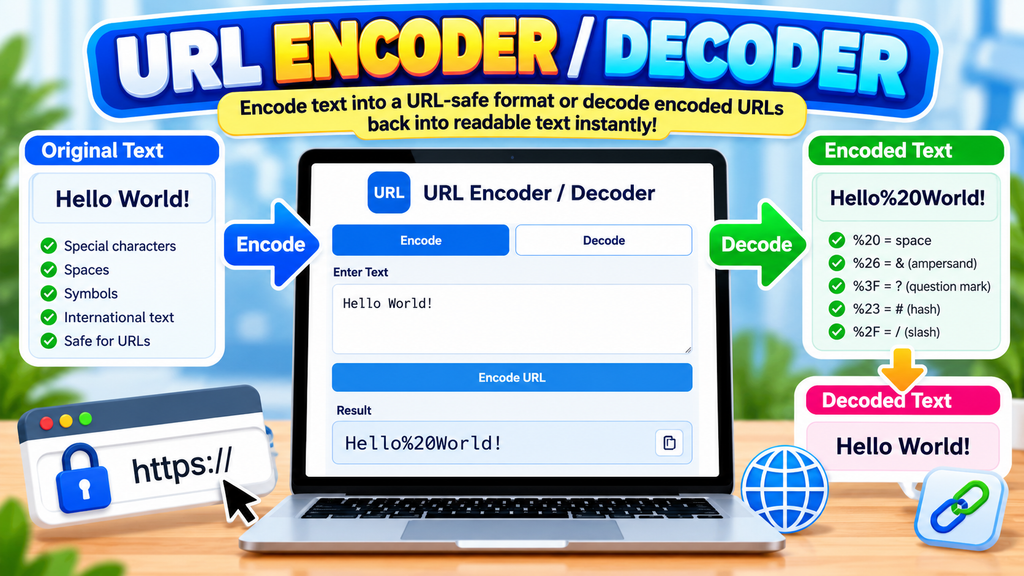
URL Encoder Decoder – Encode and Decode URLs Online
Our free URL Encoder Decoder helps you convert text into a URL-safe format and decode encoded text back into readable characters. Whether you are working with website links, search queries, special symbols, or web development projects, this online utility makes URL encoding and decoding easier.
Certain characters have special meanings inside web addresses. Spaces, ampersands, question marks, and other symbols may need to be encoded when they appear as data in a URL.
Instead of manually replacing characters, you can use this tool to perform the conversion quickly.
What Is URL Encoding?
URL encoding, also called percent encoding, is a method of representing certain characters in a web address using a percent sign followed by hexadecimal digits.
For example, a space can be represented as:
%20
An ampersand can be represented as:
%26
The percent sign itself can be represented as:
%25
These encoded values help distinguish ordinary data from characters that have special meanings in URL syntax.
URL Encoding Example
Suppose you want to encode the following text:
Living Tools Guide!
A typical encoded result is:
Living%20Tools%20Guide!
The spaces become %20, while the exclamation mark may remain unchanged in JavaScript’s encodeURIComponent() encoding.
This process is especially useful when inserting user-provided text into URL parameters.
What Is URL Decoding?
URL decoding is the reverse process.
It converts percent-encoded character sequences back into readable text.
For example:
Encoded text:
Hello%20World%21
Decoded text:
Hello World!
The sequence %20 becomes a space, while %21 becomes an exclamation mark.
Decoding is useful when reading encoded web addresses, examining URL parameters, or understanding data received by web applications.
How to Use the URL Encoder Decoder
Follow these three simple steps to convert your text.
Step 1: Select Encode or Decode
Choose Encode when you want to convert readable text into a URL-safe representation.
Choose Decode when you want to convert percent-encoded text back into readable characters.
Step 2: Enter Your Text
Type or paste the text into the input area.
For encoding, you might enter:
Best online tools & calculators
For decoding, you might enter:
Best%20online%20tools%20%26%20calculators
Step 3: Convert and Copy the Result
Click the appropriate conversion button.
Review the output and copy it for use in your website, document, or development project.
Always check the result before inserting it into a live web address.
Common URL Encoding Characters
Different characters have different percent-encoded representations.
| Character | Encoded Form | Meaning |
|---|---|---|
| Space | %20 | Separates words |
& | %26 | Ampersand |
? | %3F | Question mark |
# | %23 | Hash symbol |
= | %3D | Equals sign |
% | %25 | Percent sign |
/ | %2F | Forward slash |
+ | %2B | Plus sign |
@ | %40 | At sign |
These examples show common percent-encoded representations. Whether a character must be encoded depends on where it appears in a URL.
Why Is URL Encoding Important?
Web addresses contain characters that serve specific structural purposes.
For example, the question mark normally introduces a query string, while an ampersand often separates query parameters.
If these characters are part of a data value rather than URL structure, encoding helps preserve their intended meaning.
Consider a search query containing:
cats & dogs
If this text is inserted directly into a query parameter without suitable encoding, the ampersand may be interpreted as a separator.
Encoding the value helps prevent that ambiguity.
URL Encoding vs. URL Decoding
Although the two operations are related, they serve opposite purposes.
Encoding transforms characters into a representation suitable for a particular URL component.
Decoding restores percent-encoded sequences to their original characters.
For example:
Original:
red & blue
Encoded:
red%20%26%20blue
Decoded:
red & blue
Both operations are useful when working with web links and text transmitted through URLs.
Understanding Query Parameters
Query parameters allow websites to include additional information in a URL.
For example:
In this example, the parameter name is q, and the encoded value represents green tea.
The question mark separates the query string from the path.
The equals sign separates a parameter name from its value.
If multiple parameters are present, an ampersand commonly separates them.
Understanding these parts helps you avoid encoding characters that are intended to remain part of the URL structure.
Encoding a URL Component vs. a Complete URL
An important distinction exists between encoding a piece of text and encoding an entire web address.
For example, consider:
The URL contains structural characters such as colons, slashes, a question mark, and an equals sign.
If you encode the entire string as one component, those structural characters may also be converted.
This can produce a result that is appropriate as a parameter value but not as a directly usable website link.
For that reason, developers commonly encode individual parameter values rather than indiscriminately encoding complete URLs.
A URL Encoder Decoder is particularly useful when you understand which portion of the address needs conversion.
Before sharing a link, use the URL Encoder Decoder to check encoded text and confirm that the decoded result matches your original input.
What Is Percent Encoding?
Percent encoding represents a byte using a percent sign followed by two hexadecimal digits.
For example:
%41
represents the byte corresponding to the letter A in ASCII and UTF-8.
Similarly:
%20
represents a space.
For non-ASCII characters, UTF-8 may require multiple bytes.
Each byte is then represented by its own percent-encoded sequence.
This makes it possible to represent many international characters in URLs.
Encoding Unicode Characters
Modern websites support text written in many languages.
Characters outside the basic ASCII range are generally encoded using UTF-8 bytes when percent encoding is applied.
For example, the character:
é
is represented as:
%C3%A9
in UTF-8 percent encoding.
The character is first represented by UTF-8 bytes, and those bytes are then expressed using percent-encoded sequences.
This is important for multilingual search terms, website parameters, and international applications.
The URL Encoder Decoder is useful for website owners, developers, students, and anyone working with query parameters.
Why Does a Space Sometimes Become a Plus Sign?
You may notice that spaces are represented differently in some URLs.
In standard percent encoding, a space is commonly represented as %20.
However, HTML form-style query encoding uses + to represent a space.
For example:
green tea
might appear as:
green+tea
in form-encoded data.
These representations belong to related but different encoding conventions.
A general-purpose encoder may use %20 rather than +.
Also, a literal plus sign in a form-encoded value is normally represented as %2B.
Using our free URL Encoder Decoder, you can quickly decode encoded characters and make URL components easier to understand.
Practical Uses of URL Encoding
Website Search Queries
Search terms may contain spaces or special characters that need suitable encoding.
Web Development
Developers use encoding when constructing links, query parameters, and requests.
Sharing Links
Proper encoding helps preserve certain special characters inside shared URL values.
API Requests
Application programming interfaces frequently accept query parameters that contain encoded data.
Form Processing
Web forms use established encoding rules when transmitting submitted information.
Troubleshooting URLs
Decoding percent-encoded text can make it easier to inspect and understand a web address.
The URL Encoder Decoder simplifies converting special characters into percent-encoded text for use in web addresses.
Common Mistakes to Avoid
Encoding the Entire URL Incorrectly
Encoding all structural characters can prevent a web address from working as intended.
Encode the relevant component or parameter value instead.
Double Encoding
Double encoding happens when text that has already been encoded is encoded again.
For example:
%20
may become:
%2520
because the percent sign is encoded as %25.
Avoid applying encoding repeatedly unless it is intentionally required.
Confusing Plus Signs With Spaces
A plus sign represents a space in form-encoded query data, but not in every decoding context.
Decoding Invalid Percent Sequences
Malformed encoded input can cause some decoding functions to report an error.
Assuming Encoding Provides Security
URL encoding is a formatting technique, not encryption.
It does not hide sensitive information or make untrusted input safe by itself.
Forgetting to Test the Final Link
After constructing a URL, verify that it opens the intended destination and preserves the correct parameter values.
URL Encoding and Website SEO
Readable and consistent URLs can help visitors understand the structure of a website.
However, percent encoding and SEO-friendly URL slugs serve different purposes.
A slug such as:
best-online-tools
uses lowercase words separated by hyphens for readability.
Percent encoding, by contrast, represents characters when required by URL syntax.
For website pages, it is generally preferable to choose clear, descriptive slugs rather than rely on unnecessarily complicated encoded strings.
Frequently Asked Questions
What does a URL encoder do?
It converts certain characters into percent-encoded representations suitable for use in specific parts of a web address.
What does a URL decoder do?
It converts valid percent-encoded sequences back into readable text.
What does %20 mean in a URL?
It represents a space character.
What does %26 mean?
It represents an ampersand (&).
Is URL encoding the same as encryption?
No. Encoding changes the representation of data, while encryption is designed to protect information using cryptographic methods.
Can I encode spaces and special characters?
Yes. Encoding is commonly used for spaces and characters with special meanings in URLs.
Why is my URL double encoded?
This may happen when an already encoded string is encoded a second time.
Can URL encoding handle international characters?
Yes. UTF-8 percent encoding supports characters from many languages.
Should I encode a complete website address?
Not necessarily. When building links, it is usually better to encode the appropriate components while preserving the URL’s structural separators.
Is URL encoding useful for developers?
Yes. It is frequently used when constructing query parameters, working with APIs, and troubleshooting web requests.
Want to create clean, readable website URLs? Try our free Slug Generator to convert titles and phrases into SEO-friendly URL slugs using lowercase letters and hyphens.
Final Thoughts
Understanding URL encoding and decoding can make it easier to work with web addresses, query parameters, and special characters.
Encoding helps represent text appropriately inside URLs, while decoding restores encoded sequences to readable content.
Our free URL Encoder Decoder provides a convenient way to perform these conversions without manually replacing individual characters.
Enter your text, choose the appropriate operation, and review the result before using it in your website or project.
Want to learn more about URL encoding? Visit MDN Web Docs to understand how JavaScript’s encodeURIComponent() function converts special characters into percent-encoded text for use in URL components.