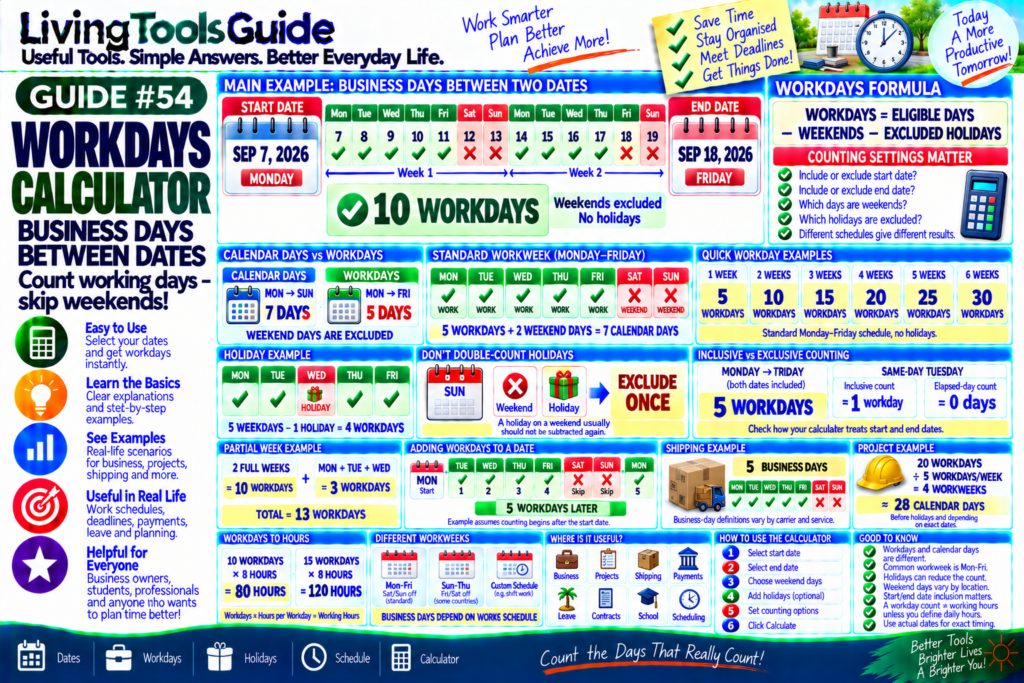
When planning a project, delivery, deadline, vacation, or work schedule, the number of calendar days between two dates is often less useful than the number of actual working days.
A Workdays Calculator helps determine the number of business days between two dates while excluding selected non-working days—usually Saturday and Sunday—and, when supported, specified holidays.
For example, suppose a period runs from:
Monday, September 7, 2026
to:
Friday, September 11, 2026
If Monday through Friday are working days and both dates are included, the result is:
5 WORKDAYS
But if the period continues through Sunday, September 13, the weekend adds two calendar days without adding any standard Monday–Friday workdays.
Important: “Business day” is not universal. Workweeks, holidays, and working schedules differ by country, employer, industry, and individual. Your calculator result depends on the weekend and holiday settings being used.
What Is a Workday?
A workday is a day considered part of a person’s or organization’s working schedule.
For many businesses, the standard workweek is:
MONDAY → FRIDAY
with:
Saturday = Weekend
Sunday = Weekend
Under this convention:
5 Workdays = 1 Standard Workweek
However, this schedule does not apply everywhere.
Some organizations operate:
Six days per week
Seven days per week
Shift schedules
Rotating schedules
or use different weekend days.
Workdays vs Calendar Days
These terms are different.
📅 Calendar Days
Every date counts.
💼 Workdays
Only selected working days count.
For example:
Monday → Sunday
contains:
7 Calendar Days
but under a Monday–Friday workweek:
5 Workdays
The two weekend days are excluded.
Basic Workdays Formula
Conceptually:
WORKDAYS = ELIGIBLE DAYS − WEEKEND DAYS − EXCLUDED HOLIDAYS
However, the exact calculation depends on:
Whether the start date is included
Whether the end date is included
Which days are weekends
Which holidays are excluded
Whether a holiday falls on an otherwise eligible workday
A calculator handles these details automatically.
Example 1 — Monday to Friday
Start:
Monday
End:
Friday
If both dates are included:
Monday ✓
Tuesday ✓
Wednesday ✓
Thursday ✓
Friday ✓
Result:
5 WORKDAYS
Example 2 — Monday to Sunday
The seven calendar days are:
Monday ✓
Tuesday ✓
Wednesday ✓
Thursday ✓
Friday ✓
Saturday ✕
Sunday ✕
Therefore:
7 CALENDAR DAYS
but:
5 WORKDAYS
Example 3 — Two Full Standard Weeks
Suppose the date range contains two complete Monday–Sunday weeks.
Calendar days:
14
Standard workdays:
5 + 5
=
10 WORKDAYS
Weekend days:
4
Therefore:
14 calendar days → 10 standard workdays
assuming no excluded holidays.
What Happens When There Is a Holiday?
Suppose a Monday–Friday period contains one holiday on Wednesday.
Normally:
5 Workdays
If Wednesday is excluded as a holiday:
Monday ✓
Tuesday ✓
Wednesday — Holiday ✕
Thursday ✓
Friday ✓
Result:
4 WORKDAYS
This is why holiday settings are important.
Avoid Double-Counting Holidays
Suppose a listed holiday falls on a Sunday.
If Sunday is already excluded as a weekend day, that date should not normally be subtracted again from the workday count.
The logic is:
Exclude a holiday only when it would otherwise count as a workday
Observed or substitute holidays can complicate this, because the non-working day may be moved to another date according to local rules.
Inclusive vs Exclusive Date Counting
This is one of the most important settings in any date calculator.
Suppose:
Start = Monday
End = Friday
If you count both dates, the result is:
5 Days
But some calculations treat the interval between dates differently and may exclude one endpoint.
Therefore, always check whether your calculator:
✓ Includes the Start Date
✓ Includes the End Date
or uses another counting convention.
Same-Day Example
Suppose:
Start Date = Tuesday
End Date = Tuesday
If that Tuesday is a normal working day and both endpoints are included:
1 WORKDAY
If the calculator measures elapsed days instead, the result could be:
0 ELAPSED DAYS
This is not a contradiction—it is a difference in counting convention.
Your calculator page should make its convention clear.
Quick Workday Examples
| Date Range / Situation | Calendar Days | Standard Workdays* |
|---|---|---|
| Monday–Friday | 5 | 5 |
| Monday–Sunday | 7 | 5 |
| 2 full weeks | 14 | 10 |
| 3 full weeks | 21 | 15 |
| 4 full weeks | 28 | 20 |
| 5 full weeks | 35 | 25 |
*Assumes Monday–Friday workdays, Saturday/Sunday weekends, inclusive full-week ranges, and no excluded holidays.
Full Weeks Shortcut
For complete seven-day weeks under a standard Monday–Friday schedule:
Workdays = Full Weeks × 5
Example:
6 Full Weeks
Calculation:
6 × 5
=
30 WORKDAYS
Then any additional partial week must be evaluated separately.
Partial Week Example
Suppose you have:
2 full weeks + Monday, Tuesday and Wednesday
Two full weeks:
2 × 5 = 10 workdays
Additional days:
Monday = 1
Tuesday = 1
Wednesday = 1
Total:
13 WORKDAYS
assuming no holidays.
Workdays Between Actual Dates
Consider:
Monday, September 7, 2026
through:
Friday, September 18, 2026
This covers two complete Monday–Friday workweeks.
If both endpoints are included and there are no excluded holidays:
10 WORKDAYS
The intervening Saturdays and Sundays are not counted.
Adding Workdays to a Date
Workday calculations can also be used to estimate a future business date.
Suppose you start on:
Monday
and need to move forward:
5 Workdays
The result depends on whether the start date itself counts as Day 1.
For example, if counting begins after Monday:
Tuesday = Day 1
Wednesday = Day 2
Thursday = Day 3
Friday = Day 4
Monday = Day 5
The weekend is skipped.
Therefore, the exact result depends on the calculator’s inclusion convention.
Subtracting Workdays
The same principle works backward.
If you need to find:
10 Workdays Before a Date
the calculator moves backward while skipping configured weekends and holidays.
This can be useful for:
📦 Shipping deadlines
📑 Document preparation
💼 Business deadlines
🏗️ Project planning
💰 Payment schedules
Business Days and Shipping
Suppose a seller says:
Delivery in 5 Business Days
This usually means non-business days do not count toward the stated processing or transit period under that seller’s definition.
For example, a weekend may interrupt the count.
However, carriers and businesses can define business days differently, and holidays may affect delivery.
Always check the company’s specific terms for important shipments.
Business Days and Payments
Financial institutions often describe processing times using business days.
For example:
2–3 Business Days
does not necessarily mean:
48–72 hours
A weekend or holiday can extend the calendar time before processing is completed.
The actual definition depends on the institution and transaction.
Business Days and Project Planning
Suppose a project has:
20 Workdays
Under a standard five-day workweek:
20 ÷ 5
=
4 WORKWEEKS
But four workweeks span approximately:
28 CALENDAR DAYS
before considering holidays and the exact start/end timing.
This distinction is useful when planning deadlines.
Workdays and Holidays
Public holidays differ between:
🌍 Countries
🏛️ Regions
🏢 Organizations
🏫 Schools
🏦 Banks
Some holidays occur on fixed dates, while others vary each year.
Therefore, a generic Workdays Calculator should not silently assume a universal holiday calendar.
If your calculator allows custom holidays, users can enter the specific dates they want excluded.
When calculating workdays, remember that public holidays may also need to be excluded. You can check the official U.S. federal holiday schedule from the Office of Personnel Management.
Custom Weekend Settings
A more flexible Workdays Calculator may allow users to choose which weekdays are considered non-working.
For example:
Standard Setting
Saturday + Sunday
But another schedule might use:
Friday + Saturday
or:
Sunday only
The calculator should apply the user’s selected workweek whenever this feature is available.
Workdays vs Working Hours
A workday count does not tell you the total number of working hours unless a daily schedule is also defined.
For example:
10 Workdays
at:
8 hours/day
would be:
10 × 8
=
80 Working Hours
But if the daily schedule is 7.5 hours:
10 × 7.5
=
75 Working Hours
So:
Workdays × Hours per Workday = Working Hours
when every counted workday uses the same number of hours.
Example — 15 Workdays to Hours
Assume:
8 Hours per Workday
Calculation:
15 × 8
=
120 WORKING HOURS
This can be useful for basic project and staffing estimates.
Why Use a Workdays Calculator?
Manually counting weekdays across several months can be tedious.
A Workdays Calculator can quickly help with:
💼 Business Deadlines
📅 Project Planning
📦 Shipping
🏦 Payments
🏖️ Leave Planning
📑 Contracts
🎓 School Schedules
⏱️ Work Scheduling
It also reduces the chance of accidentally counting weekends as working days.
How to Use the Workdays Calculator
Using your LivingToolsGuide calculator is simple:
1 — Select Start Date
Example:
September 7, 2026
2 — Select End Date
September 18, 2026
3 — Choose Weekend Settings
Example:
Saturday + Sunday
4 — Add Holidays
If your calculator supports custom holiday exclusions.
5 — Choose Date-Inclusion Settings
If available.
6 — Click Calculate
For the example above, with both endpoints included, Saturday/Sunday excluded, and no holidays:
10 WORKDAYS
Calculate Business Days Now
Need to know how many working days fall between two dates?
Use our Workdays Calculator to count business days while excluding your selected weekend days and, where supported, specified holidays.
📅 Dates | 💼 Workdays | 🎉 Holidays | ⏱️ Schedule | 🧮 Calculator
Count the Days That Really Count!