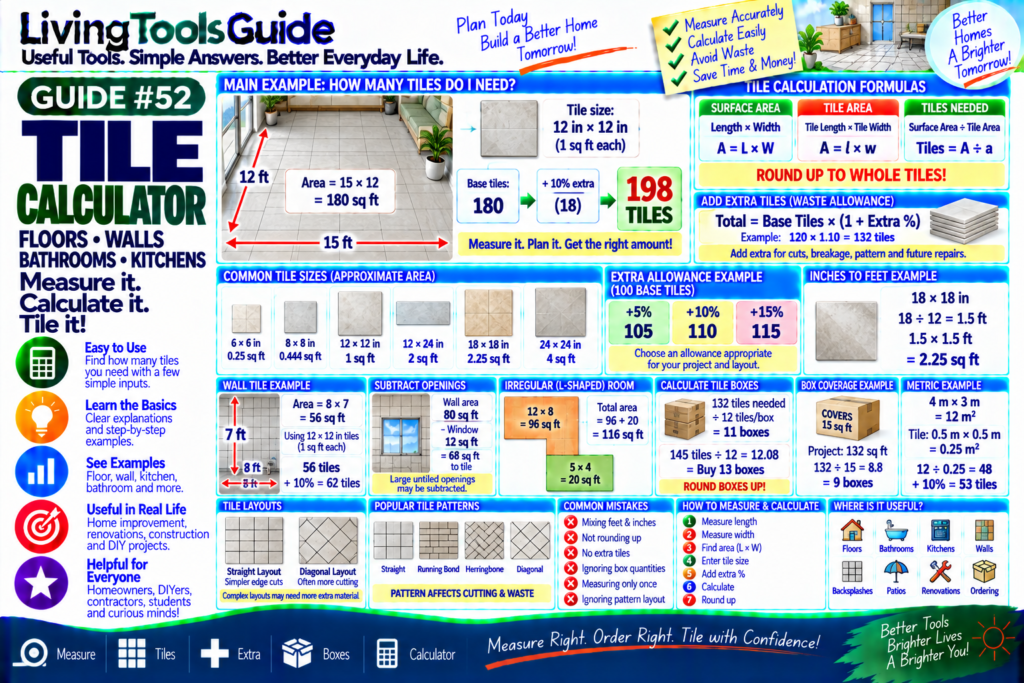
Planning a tiling project starts with one important question:
How Many Tiles Do I Need?
Whether you’re tiling a floor, bathroom, kitchen, backsplash, patio, or wall, you need to know the total area to cover and the size of each tile.
For example, suppose your floor is:
12 ft × 10 ft
The floor area is:
12 × 10 = 120 sq ft
If each tile covers:
1 sq ft
you need approximately:
120 Tiles
But it’s usually sensible to allow extra material for cuts, breakage, pattern matching, and future repairs.
With a 10% allowance:
120 × 1.10 = 132
Estimated order:
132 Tiles
A Tile Calculator makes these calculations quick and easy.
Important: Calculator results are estimates. Actual tile requirements can vary because of room shape, grout joints, tile layout, pattern, cuts, breakage, batch availability, and installation method.
What Does a Tile Calculator Calculate?
For additional information about tile installation standards and industry guidance, you can visit the Tile Council of North America.
A Tile Calculator can help estimate:
🏠 Room Area
🔲 Tile Area
🔢 Number of Tiles
➕ Extra/Waste Allowance
📦 Boxes Required
📐 Wall or Floor Coverage
The basic calculation compares the area you need to cover with the area covered by each tile.
Step 1 — Calculate the Area
For a rectangular floor or wall:
Area = Length × Width
Example:
Length = 12 ft
Width = 10 ft
Calculate:
12 × 10
=
120 sq ft
This is the surface area that needs to be tiled.
Step 2 — Calculate Tile Area
Suppose each tile measures:
12 in × 12 in
Tile area:
12 × 12
=
144 square inches
Since:
144 in² = 1 ft²
each tile covers:
1 sq ft
Step 3 — Calculate Number of Tiles
Use:
Tiles Needed = Surface Area ÷ Tile Area
For our example:
120 sq ft ÷ 1 sq ft
=
120 Tiles
Always round up when the result is not a whole tile.
You cannot normally purchase or install a fraction of a whole tile as part of your total material count.
Example — Result With a Fraction
Suppose:
Surface Area = 125 sq ft
Each tile covers:
1.5 sq ft
Calculation:
125 ÷ 1.5
=
83.33 tiles
Round up:
84 Tiles
This is the theoretical minimum before adding any extra allowance.
Adding Extra Tiles
Tiling projects often require additional tiles because some material may be lost to:
Cuts
Breakage
Damaged tiles
Pattern matching
Installation adjustments
Future repairs
A commonly used planning allowance for straightforward layouts might be around 10%, but the appropriate amount depends on the project.
For complicated patterns or rooms with many cuts, more may be needed.
Extra Tile Formula
If you choose a waste allowance:
Order Quantity = Base Tiles × (1 + Waste % ÷ 100)
For example:
Base Tiles = 120
Extra Allowance = 10%
Calculation:
120 × 1.10
=
132 Tiles
5%, 10% and 15% Examples
Suppose the base requirement is:
100 Tiles
With 5% extra:
100 × 1.05
=
105 Tiles
With 10% extra:
100 × 1.10
=
110 Tiles
With 15% extra:
100 × 1.15
=
115 Tiles
The correct allowance depends on the tile layout and installation.
Complete Tile Calculation Example
Suppose your room measures:
15 ft × 12 ft
Room area:
15 × 12
=
180 sq ft
Suppose each tile measures:
12 in × 12 in
Each tile covers:
1 sq ft
Base tiles:
180 ÷ 1
=
180 Tiles
Add a 10% allowance:
180 × 1.10
=
198 Tiles
Estimated order:
198 Tiles
Tile Size Conversion
One common source of mistakes is mixing feet and inches.
If your room measurements are in feet but your tile measurements are in inches, convert the tile dimensions first.
Use:
Tile Length in Feet = Tile Length in Inches ÷ 12
and:
Tile Width in Feet = Tile Width in Inches ÷ 12
Example — 18 × 18 Inch Tile
Convert to feet:
18 ÷ 12 = 1.5 ft
Therefore:
18 in × 18 in
becomes:
1.5 ft × 1.5 ft
Tile area:
1.5 × 1.5
=
2.25 sq ft
If your floor is:
180 sq ft
then:
180 ÷ 2.25
=
80 Tiles
Before adding extra allowance.
Example — 12 × 24 Inch Tile
Convert:
12 inches = 1 ft
24 inches = 2 ft
Therefore:
Tile Area = 1 × 2 = 2 sq ft
For a:
200 sq ft floor
Base requirement:
200 ÷ 2
=
100 Tiles
With 10% extra:
100 × 1.10
=
110 Tiles
Quick Tile Size Table
| Tile Size | Approx. Area per Tile |
|---|---|
| 6 × 6 in | 0.25 sq ft |
| 8 × 8 in | 0.444 sq ft |
| 12 × 12 in | 1 sq ft |
| 12 × 24 in | 2 sq ft |
| 18 × 18 in | 2.25 sq ft |
| 24 × 24 in | 4 sq ft |
These values assume nominal tile dimensions. Actual tile dimensions and coverage may vary.
Calculating Tiles for a Wall
The same formula works for walls.
Suppose a bathroom wall measures:
8 ft wide × 7 ft high
Wall area:
8 × 7
=
56 sq ft
Using 12 × 12 inch tiles:
1 tile = 1 sq ft
Base requirement:
56 Tiles
With 10% extra:
56 × 1.10 = 61.6
Round up:
62 Tiles
Subtracting Doors and Windows
For wall tiling, you may choose to subtract large areas that will not be tiled.
Suppose:
Wall Area = 80 sq ft
Window Area:
12 sq ft
Then:
Tile Area = 80 − 12 = 68 sq ft
If each tile covers 1 sq ft:
68 Base Tiles
Then apply your chosen extra allowance.
For small openings, some installers may prefer not to subtract them because extra tiles may still be useful for cuts and waste.
Irregular Rooms
If a room is not a simple rectangle, divide it into smaller sections.
For example:
Section A
10 × 8 = 80 sq ft
Section B
6 × 5 = 30 sq ft
Then add:
80 + 30
=
110 sq ft
Now calculate the tile requirement using the combined area.
L-Shaped Room Example
An L-shaped room can be divided into two rectangles.
Rectangle 1
12 ft × 8 ft
=
96 sq ft
Rectangle 2
5 ft × 4 ft
=
20 sq ft
Total:
96 + 20 = 116 sq ft
This is usually easier and more accurate than trying to estimate the whole irregular shape at once.
Calculating Tile Boxes
Tiles are often sold by the box rather than individually.
Suppose:
Tiles Needed = 132
and each box contains:
12 Tiles
Formula:
Boxes = Tiles Needed ÷ Tiles per Box
Calculation:
132 ÷ 12
=
11 Boxes
What If the Box Result Isn’t Whole?
Suppose you need:
145 Tiles
and each box contains:
12 Tiles
Calculation:
145 ÷ 12
≈
12.08 Boxes
You need to round up:
13 Boxes
because you generally cannot buy 0.08 of a sealed box if the retailer only sells full boxes.
Calculate by Box Coverage
Some tile packaging lists coverage instead of tile count.
For example:
One box covers 15 sq ft
Project requirement including allowance:
132 sq ft
Calculate:
132 ÷ 15
=
8.8 boxes
Round up:
9 Boxes
Always check the actual coverage printed on the product packaging.
Metric Tile Calculation
The same method works with metric measurements.
Suppose a floor is:
4 m × 3 m
Area:
4 × 3
=
12 m²
Tiles measure:
0.5 m × 0.5 m
Tile area:
0.5 × 0.5
=
0.25 m²
Base tiles:
12 ÷ 0.25
=
48 Tiles
With 10% extra:
48 × 1.10
=
52.8
Round up:
53 Tiles
Straight vs Diagonal Tile Layouts
Tile layout can affect the amount of cutting and waste.
Straight Layout
Tiles run parallel to the walls.
This can often result in simpler cuts.
Diagonal Layout
Tiles are installed at an angle.
This can require more cuts around room edges.
Therefore, diagonal or complex layouts may justify a larger extra-material allowance than a straightforward installation.
Patterned Tile Layouts
Patterns such as:
🔷 Diagonal
🧱 Brick / Running Bond
🌲 Herringbone
🔶 Geometric Patterns
🎨 Mixed Designs
may require additional material because tiles must be cut or matched in specific ways.
Always consider the actual installation pattern when choosing your allowance.
Why You May Want Spare Tiles
Keeping some spare tiles after installation can be useful.
Years later, a tile may:
Crack
Chip
Become stained
or:
Need to be removed for a repair
Matching the exact tile later can be difficult because products may be discontinued or manufacturing batches can vary slightly.
A few spare matching tiles can therefore be valuable.
Common Tile Calculation Mistakes
❌ Mixing Feet and Inches
Make sure room and tile measurements use compatible units.
❌ Forgetting to Round Up
Always round whole-tile requirements upward.
❌ Ignoring Cuts and Waste
Ordering exactly the theoretical minimum can leave you short.
❌ Forgetting Box Quantities
If tiles are sold by full boxes, round the box count upward.
❌ Measuring Only Once
Double-check room dimensions before ordering.
❌ Ignoring Pattern Layout
Diagonal and complex patterns may require additional material.
How to Measure a Room for Tile
1 — Measure Length
Measure the longest dimension.
2 — Measure Width
Measure the other dimension.
3 — Calculate Area
Length × Width
4 — Measure Tile
Record tile length and width.
5 — Calculate Tile Area
Tile Length × Tile Width
6 — Calculate Tiles
Surface Area ÷ Tile Area
7 — Add Allowance
Apply the extra percentage appropriate to your project.
8 — Round Up
Round to whole tiles or whole boxes as required.
Where Is a Tile Calculator Useful?
A Tile Calculator can help with:
🏠 Flooring
🚿 Bathrooms
🍳 Kitchens
🧱 Walls
🪟 Backsplashes
🌿 Patios
🏗️ Renovations
📦 Material Ordering
How to Use the Tile Calculator
Using your LivingToolsGuide calculator is simple:
1 — Enter Surface Length
Example:
15 ft
2 — Enter Surface Width
12 ft
3 — Enter Tile Size
Example:
12 × 12 in
4 — Select Extra/Waste Percentage
Example:
10%
5 — Click Calculate
Result:
Surface Area = 180 sq ft
Base Tiles = 180
Extra Allowance = 18
Estimated Total = 198 Tiles
Calculate Your Tiles Now
Planning a floor, bathroom, wall, or renovation project?
Use our Tile Calculator to estimate the number of tiles and boxes you may need based on your surface dimensions, tile size, and chosen extra-material allowance.
📏 Measure | 🔲 Tiles | ➕ Extra | 📦 Boxes | 🧮 Calculator
Measure Right. Order Right. Tile with Confidence!