Working out a date several months in the future—or several months in the past—sounds simple, but calendar months do not all contain the same number of days.
Some months have 30 days, others have 31 days, and February normally has 28 days or 29 in a leap year. This means adding months is different from simply adding a fixed number of days.
A Month Calculator makes the process easier. Enter a starting date, choose whether you want to add or subtract months, enter the number of months, and the calculator determines the resulting calendar date.
What Is a Month Calculator?
A Month Calculator is a date tool designed to move a starting date forward or backward by a selected number of calendar months.
For example:
Starting Date: January 15, 2026
Add: 3 months
Result:
April 15, 2026
You can also work backward:
Starting Date: October 15, 2026
Subtract: 4 months
Result:
June 15, 2026
How to Add Months to a Date
For dates that exist in both the starting and destination months, the basic idea is straightforward.
Example:
March 10, 2026 + 5 months
Count forward:
April → 1
May → 2
June → 3
July → 4
August → 5
Therefore:
March 10, 2026 + 5 months = August 10, 2026
How to Subtract Months From a Date
The same principle works in reverse.
Example:
September 20, 2026 − 3 months
Count backward:
August → 1
July → 2
June → 3
Result:
June 20, 2026
What Happens at the End of a Month?
This is where month calculations become more interesting.
Suppose you start with:
January 31
and add one month.
February does not have a January-style 31st day. Depending on the calculator’s date-handling rule, the result is commonly adjusted to a valid date at or around the end of February.
For this reason, end-of-month calculations should follow the exact rules used by the calculator or software system rather than assuming that every month has the same length.
This is especially important when working with:
📅 Billing dates
💳 Payment schedules
🏠 Rental periods
📑 Contracts
🎂 Anniversaries
💼 Project deadlines
Months Have Different Lengths
For more information about calendars and how months and years are organized, see the U.S. Naval Observatory’s calendar reference.
Calendar months contain different numbers of days.
| Month | Days |
|---|---|
| January | 31 |
| February | 28 or 29 |
| March | 31 |
| April | 30 |
| May | 31 |
| June | 30 |
| July | 31 |
| August | 31 |
| September | 30 |
| October | 31 |
| November | 30 |
| December | 31 |
That is why:
1 month does not always equal 30 days
For calendar calculations, it is usually better to work with actual months rather than converting months into a fixed number of days.
Leap Years and Month Calculations
February normally contains 28 days.
During a leap year, February contains:
29 days
A leap year generally occurs every four years, with century-year exceptions under the Gregorian calendar rules.
For example:
2028 is a leap year.
Therefore:
February 2028 has 29 days
A good Month Calculator automatically handles these calendar differences.
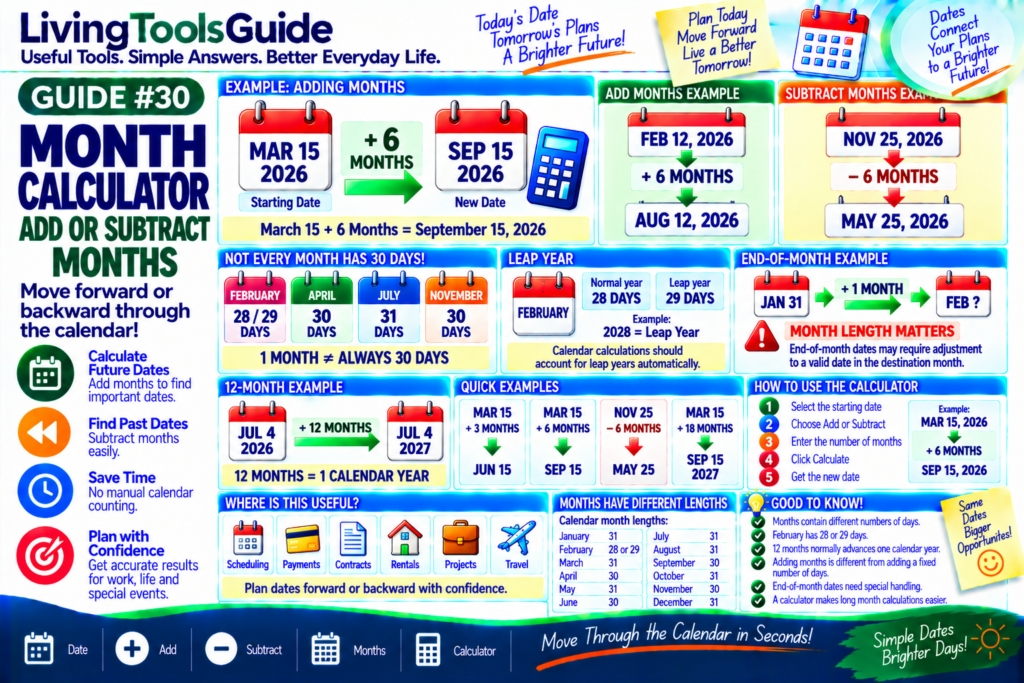
Example 1 — Add 6 Months
Starting date:
February 12, 2026
Add:
6 months
Count forward:
March → April → May → June → July → August
Result:
August 12, 2026
Example 2 — Subtract 6 Months
Starting date:
November 25, 2026
Subtract:
6 months
Result:
May 25, 2026
Example 3 — Add 12 Months
Starting date:
July 4, 2026
Add:
12 months
Result:
July 4, 2027
In most ordinary cases:
12 Months = 1 Calendar Year
Example 4 — Add 18 Months
Starting date:
March 15, 2026
Add:
18 months
You can think of this as:
12 months + 6 months
First:
March 15, 2026 + 12 months = March 15, 2027
Then:
+ 6 months = September 15, 2027
Result:
September 15, 2027
Months vs Days
Months and days are not interchangeable fixed units.
For example:
January = 31 days
April = 30 days
February = 28 or 29 days
Therefore:
Adding 1 month ≠ always adding 30 days
This distinction is important when calculating calendar dates.
Why Use a Month Calculator?
A Month Calculator can help with:
📅 Scheduling — calculate future or previous dates.
💳 Payments — estimate monthly payment dates.
📑 Contracts — determine dates several months ahead.
🏠 Rentals — calculate rental or lease periods.
💼 Projects — establish future milestones.
🎂 Personal Dates — calculate anniversaries and other events.
✈️ Travel Planning — work backward or forward from important dates.
How to Use the Month Calculator
Using the calculator is simple:
1 — Select the starting date
2 — Choose Add or Subtract
3 — Enter the number of months
4 — Click Calculate
5 — View the resulting date
Example:
Start: March 15, 2026
Add: 6 months
Result:
September 15, 2026
Calculate a Date by Months
Need to know the date several months from now—or several months ago?
Use our Month Calculator to add or subtract months from a date quickly.
📅 Date | ➕ Add | ➖ Subtract | 🗓️ Months | 🧮 Calculator
Move Through the Calendar in Seconds!