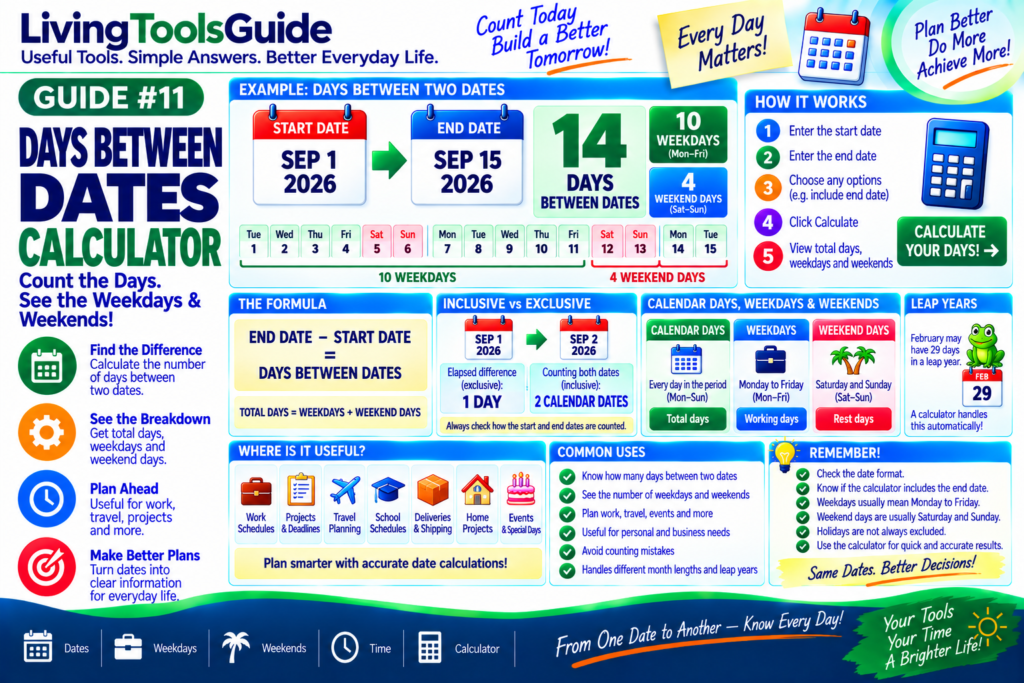
Sometimes you need to know more than the total number of days between two dates. You may also want to know how many weekdays and weekend days fall within that period.
For example, you might need to calculate the time between a project start date and deadline, estimate working days before an event, or simply find out how many days remain between two important dates.
A Days Between Dates Calculator makes this easy by calculating the difference between two dates and separating the result into useful categories such as total days, weekdays, and weekend days.
What Does “Days Between Dates” Mean?
Days between dates refers to the amount of time separating a start date and an end date.
For example:
Start Date: September 1, 2026
End Date: September 11, 2026
The calculator determines the number of calendar days separating those dates.
Depending on the calculator settings, you may also be able to include both the start and end dates in the count.
Calendar Days vs Weekdays vs Weekends
Understanding these three terms is important.
Calendar Days include every day of the week:
Monday → Tuesday → Wednesday → Thursday → Friday → Saturday → Sunday
Weekdays normally include:
Monday through Friday
Weekend Days normally include:
Saturday and Sunday
Therefore:
Total Calendar Days = Weekdays + Weekend Days
This breakdown can be particularly useful when planning work, travel, projects, appointments, deliveries, and deadlines.
For official information about calendars and standard timekeeping, see the U.S. Naval Observatory’s calendar reference.
How Does a Days Between Dates Calculator Work?
The basic calculation is:
End Date − Start Date = Days Between Dates
The calculator first determines the complete date difference.
It can then examine each day within the selected period and determine whether it falls on a weekday or weekend.
The result may look like:
Total Days: 30
Weekdays: 22
Weekend Days: 8
This gives you much more information than simply knowing that the two dates are 30 days apart.
Example 1 — Simple Date Difference
Suppose you enter:
Start Date: September 1, 2026
End Date: September 11, 2026
The basic elapsed difference is:
10 days
If you choose an inclusive calculation that counts both September 1 and September 11, the result would instead be:
11 calendar dates
This is why it is important to understand whether a calculator uses exclusive or inclusive counting.
Example 2 — Weekdays and Weekends
Suppose a selected date range contains:
14 calendar days
Because two complete weeks are included, that period contains:
10 weekdays
and
4 weekend days
So:
14 Total Days = 10 Weekdays + 4 Weekend Days
Why Count Weekdays Separately?
Weekdays are useful when estimating activities that normally happen during the working week.
Common examples include:
💼 Work schedules — estimate working time between dates.
📅 Project planning — measure time available before deadlines.
🏦 Business planning — estimate ordinary Monday–Friday periods.
📦 Shipping estimates — understand potential working-day windows.
🎓 School planning — calculate weekday periods between important dates.
🏠 Home projects — estimate available working days.
Remember that a simple weekday calculation usually does not automatically exclude public holidays unless the calculator specifically supports holiday calendars.
Why Count Weekend Days?
Weekend totals can also be useful.
For example, you may want to know how many Saturdays and Sundays occur during:
- a vacation
- a construction project
- a savings period
- an exercise program
- an event schedule
- a school term
- a long trip
Separating weekdays and weekends gives you a clearer picture of the entire period.
Inclusive vs Exclusive Date Counting
This is one of the most important concepts when calculating days between dates.
Suppose:
Start: September 1
End: September 2
The elapsed difference is:
1 day
But if you count both calendar dates themselves:
September 1 + September 2
the inclusive count is:
2 days
Different situations require different counting methods, so always check how your chosen calculator treats the start and end dates.
Leap Years and Different Month Lengths
Manual date calculations can become confusing because months do not all contain the same number of days.
Months can contain:
28, 29, 30, or 31 days
Leap years add another complication because February contains 29 days instead of 28.
A date calculator can handle these calendar differences automatically.
Where Is a Days Between Dates Calculator Useful?
A date difference calculator can help with:
💼 Work and projects
✈️ Travel planning
🎂 Birthdays and anniversaries
🏠 Home projects
📚 School schedules
📦 Delivery planning
💰 Financial periods
🏃 Fitness challenges
📅 Event countdowns
📝 Contracts and deadlines
Instead of manually counting dates on a calendar, you can enter two dates and receive the result instantly.
How to Use the Days Between Dates Calculator
Using your LivingToolsGuide calculator should be simple:
Step 1: Enter the Start Date.
Step 2: Enter the End Date.
Step 3: Choose any available counting options.
Step 4: Click Calculate.
Step 5: Review the results for total days, weekdays and weekends, according to the options supported by your calculator.
Calculate the Days Between Your Dates
Need to know exactly how much time separates two dates?
Use our Days Between Dates Calculator to quickly calculate the date difference and see the weekday/weekend breakdown available in the tool.