Whether you’re waiting for a birthday, holiday, vacation, wedding, exam, deadline, or another important event, knowing exactly how many days are left can make planning much easier.
Instead of counting dates manually on a calendar, a Countdown Calculator quickly calculates the number of days between today—or another starting date—and a future date.
It is a simple tool, but it can be useful for everything from personal celebrations to work deadlines and travel planning.
What Is a Countdown Calculator?
A Countdown Calculator determines how much time remains until a selected date.
You choose your target date, and the calculator finds the difference between the starting date and that date.
For example:
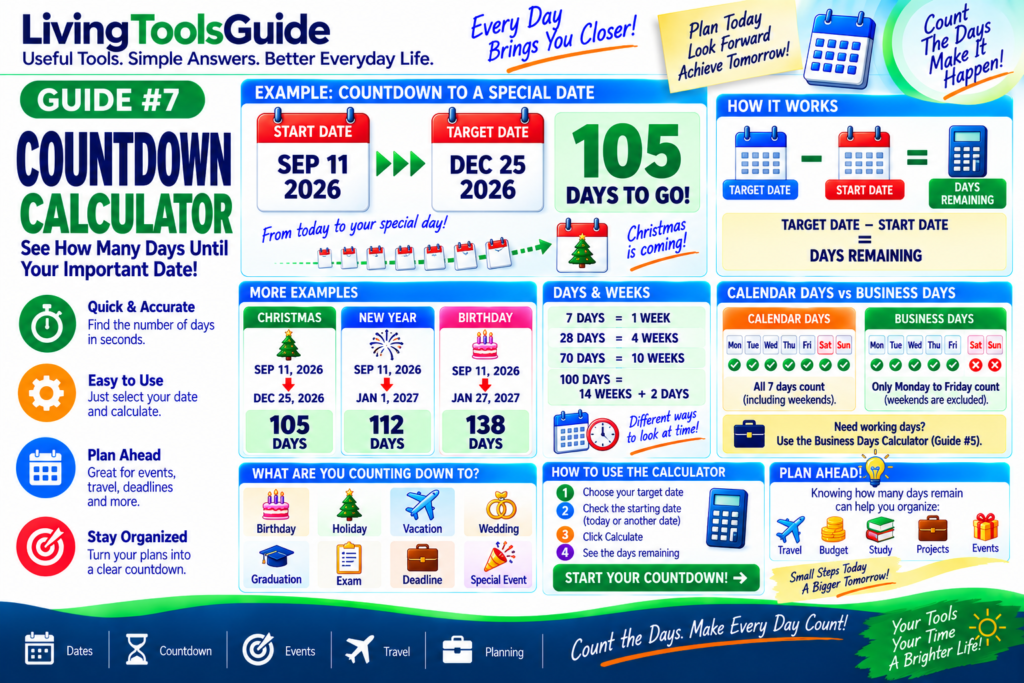
Start Date: September 11, 2026
Target Date: December 25, 2026
Result:
105 days remaining
That means Christmas Day is 105 days after September 11, 2026.
How Does a Countdown Calculator Work?
The basic idea is:
Target Date − Start Date = Days Remaining
The calculator handles differences in:
- Month lengths
- 30-day and 31-day months
- February
- Leap years
- Year changes
This makes it much easier and more reliable than manually counting days on a calendar.
For official information about calendars and date systems, see the U.S. Naval Observatory’s calendar reference.
Example 1 — Countdown to Christmas
Suppose the starting date is:
September 11, 2026
and the target date is:
December 25, 2026
The difference is:
105 days
So:
September 11, 2026 → December 25, 2026 = 105 days
🎄 105 DAYS TO GO!
Example 2 — Countdown to New Year’s Day
Start:
September 11, 2026
Target:
January 1, 2027
The difference is:
112 days
So there are 112 days until January 1, 2027 from September 11, 2026.
Example 3 — Countdown to a Birthday
Imagine someone’s birthday is:
January 27, 2027
Starting from:
September 11, 2026
the countdown is:
138 days
A countdown calculator lets you find this instantly without checking each month separately.
Days vs Weeks Until an Event
Sometimes a countdown is easier to understand when expressed in both days and weeks.
For example:
70 days
is exactly:
10 weeks
And:
100 days
is:
14 weeks + 2 days
Your calculator may display days only or provide additional units depending on its design.
Why Manual Date Counting Can Be Difficult
Months do not all contain the same number of days.
Some have:
30 days
Others have:
31 days
February normally has:
28 days
and during a leap year:
29 days
Calculations can become even more confusing when the countdown crosses from one year into another.
A Countdown Calculator handles these calendar differences automatically.
What Can You Count Down To?
You can use a countdown calculator for almost any future date.
🎂 Birthdays
🎄 Holidays
💍 Weddings
✈️ Vacations
🎓 Graduations
📝 Exams
💼 Project deadlines
🏠 Moving dates
🎉 Special events
💳 Payment dates
📅 Appointments
🏆 Sporting events
Countdown for Travel Planning
Suppose your vacation begins in 90 days.
Knowing this can help you organize tasks such as:
Booking accommodation
Checking travel documents
Creating a budget
Planning activities
Packing
Arranging transportation
A countdown turns a future date into a clear amount of remaining time.
Countdown for Work and Projects
Countdowns are also useful in professional situations.
For example:
Project deadline: 45 days away
A team could divide that period into smaller stages:
Days 1–10 → Research
Days 11–25 → Development
Days 26–35 → Testing
Days 36–45 → Final review and delivery
This makes the countdown useful as a simple planning reference.
Calendar Days vs Business Days
A normal Countdown Calculator generally counts calendar days.
That means:
Monday through Sunday are included.
A Business Days Calculator is different because it normally excludes weekends and may also exclude selected holidays.
For example:
30 calendar days
does not necessarily mean:
30 business days
If you need to calculate working days for a job, contract or business deadline, use the Business Days Calculator instead.
How to Use the Countdown Calculator
Step 1 — Choose Your Target Date
Select the date of your future event.
Step 2 — Check the Starting Date
Depending on the calculator, the starting point may be today’s date or another date you select.
Step 3 — Calculate
Click the calculation button.
Step 4 — View Your Countdown
The calculator will show the remaining time, such as:
105 DAYS TO GO!
Now you can use that number for planning, scheduling or simply enjoying the anticipation of your event.
Why Use a Countdown Calculator?
⚡ Fast
Find the number of days instantly.
📅 Accurate Calendar Handling
Avoid manually counting different month lengths.
🎯 Helpful for Planning
Know exactly how much time remains before an important date.
🎉 Useful for Events
Perfect for birthdays, holidays, weddings and vacations.
💼 Useful for Deadlines
Track upcoming work, school and personal deadlines.
Important Note About Date Counting
Date calculators can differ in whether they include or exclude the starting date or target date.
For example, calculating the days from one date to the next normally measures the elapsed time between them rather than counting both dates as full days.
Always check the calculator’s counting method when the result is being used for an important deadline.