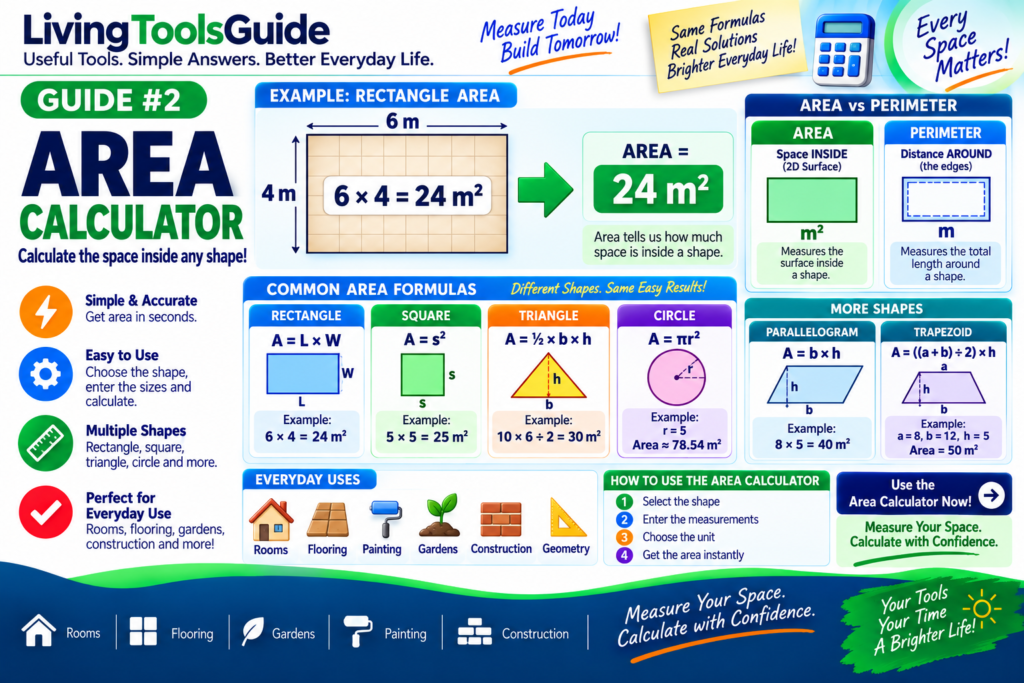
Area calculations are used everywhere—from measuring rooms and flooring to planning gardens, construction projects, painting, tiling, and solving geometry problems.
Area tells you how much two-dimensional space is inside a shape.
Different shapes require different formulas. A rectangle uses length and width, a triangle uses base and height, while a circle uses its radius.
An Area Calculator makes these calculations easier by allowing you to enter the measurements and quickly calculate the area.
What Is Area?
Area is the amount of surface contained within the boundaries of a two-dimensional shape.
For more information about area and its mathematical definition, see the Area reference from Wolfram MathWorld.
For example, imagine a rectangular room that measures:
5 meters long
and
4 meters wide
The formula is:
Area = Length × Width
Therefore:
5 × 4 = 20
The area of the room is:
20 m²
The small ² means “squared.”
This is because area measures space in two dimensions.
Common Area Units
Area is normally expressed using square units.
Common examples include:
Square millimeters — mm²
Square centimeters — cm²
Square meters — m²
Square kilometers — km²
Square inches — in²
Square feet — ft²
Square yards — yd²
For example:
10 m × 5 m = 50 m²
Rectangle Area Formula
A rectangle has two important measurements:
Length
and
Width
The formula is:
Area = Length × Width
Or:
A = L × W
Example
Suppose a room is:
6 m long
and
4 m wide
Calculate:
6 × 4 = 24
Therefore:
Area = 24 m²
Square Area Formula
A square has four equal sides.
The formula is:
Area = Side × Side
or:
A = s²
Example
Suppose each side of a square measures:
5 m
Calculate:
5 × 5 = 25
Therefore:
Area = 25 m²
Triangle Area Formula
For a triangle, you need the:
Base
and
Height
The formula is:
Area = (Base × Height) ÷ 2
or:
A = ½ × b × h
Example
Suppose:
Base = 10 m
Height = 6 m
First multiply:
10 × 6 = 60
Then divide by 2:
60 ÷ 2 = 30
Therefore:
Area = 30 m²
Circle Area Formula
A circle uses its radius.
The radius is the distance from the center of the circle to its edge.
The formula is:
Area = π × Radius²
or:
A = πr²
π (pi) is approximately:
3.14159
Example
Suppose the radius is:
5 m
First square the radius:
5² = 25
Then:
3.14159 × 25 ≈ 78.54
Therefore:
Area ≈ 78.54 m²
Parallelogram Area Formula
The formula is:
Area = Base × Height
or:
A = b × h
Example
Suppose:
Base = 8 m
Height = 5 m
Calculate:
8 × 5 = 40
Therefore:
Area = 40 m²
Trapezoid Area Formula
A trapezoid has two parallel sides.
The formula is:
Area = ((a + b) ÷ 2) × h
where:
a = first parallel side
b = second parallel side
h = height
Example
Suppose:
a = 8 m
b = 12 m
h = 5 m
Add the parallel sides:
8 + 12 = 20
Divide by 2:
20 ÷ 2 = 10
Multiply by the height:
10 × 5 = 50
Therefore:
Area = 50 m²
Quick Area Formula Table
| Shape | Formula |
|---|---|
| Square | A = s² |
| Rectangle | A = L × W |
| Triangle | A = ½ × b × h |
| Circle | A = πr² |
| Parallelogram | A = b × h |
| Trapezoid | A = ((a + b) ÷ 2) × h |
Example — Calculate the Area of a Room
Imagine your room measures:
Length = 12 ft
Width = 10 ft
Use:
Area = Length × Width
Therefore:
12 × 10 = 120
The room area is:
120 ft²
This measurement can help when estimating flooring, carpet, tiles, or other materials.
Example — Calculate Flooring Area
Suppose a floor measures:
8 m × 6 m
Calculate:
8 × 6 = 48
Therefore:
Floor area = 48 m²
In a real flooring project, you may need to purchase somewhat more material than the exact calculated area to allow for cutting, fitting, pattern matching, or waste.
Example — Calculate Wall Area
Suppose a wall measures:
Width = 5 m
Height = 3 m
Calculate:
5 × 3 = 15
Therefore:
Wall area = 15 m²
If the wall contains windows or doors, their areas can be calculated separately and subtracted when an estimate requires only the uncovered wall surface.
Area vs Perimeter
Area and perimeter are different measurements.
Area measures the surface inside a shape.
Perimeter measures the distance around the outside of a shape.
For a rectangle measuring:
5 m × 4 m
Area:
5 × 4 = 20 m²
Perimeter:
2 × (5 + 4) = 18 m
So:
Area = 20 m²
Perimeter = 18 m
Notice that area uses square units, while perimeter uses ordinary units of length.
Why Calculate Area?
Area calculations are useful for many everyday tasks.
🏠 Rooms — measuring floor space.
🧱 Construction — estimating surface dimensions.
🎨 Painting — measuring walls and ceilings.
🌱 Gardening — measuring lawns and garden beds.
🪟 Walls — estimating coverings or materials.
🧩 Tiles — estimating the surface to cover.
🛋️ Flooring — planning carpet, wood, laminate or other flooring.
📐 Geometry — solving mathematical problems.
How to Use an Area Calculator
An Area Calculator removes much of the manual calculation.
Typically, you:
1. Select the shape.
For example:
Rectangle, Square, Triangle or Circle.
2. Enter the required measurements.
For example:
Length = 10
Width = 6
3. Select the measurement unit.
For example:
Meters or feet.
4. Calculate the result.
For a rectangle:
10 × 6 = 60
Result:
60 m²
Tips for Accurate Area Calculations
Always use measurements in compatible units before applying a formula.
For example, don’t directly multiply:
5 meters × 200 centimeters
without first converting one measurement.
Since:
200 cm = 2 m
the calculation becomes:
5 m × 2 m = 10 m²
Also check whether the tool expects radius or diameter when calculating circles.
Remember:
Diameter = 2 × Radius
Area Calculator: Convert Your Measurements Into Area
Instead of manually remembering different formulas, you can use our Area Calculator to calculate the area of common shapes quickly.
Enter the required measurements, choose the appropriate shape and calculate the result.
The Area Calculator makes it easy to calculate the area of common shapes quickly and check your measurements accurately.
Our Area Calculator helps you check area calculations quickly for everyday measurement projects.