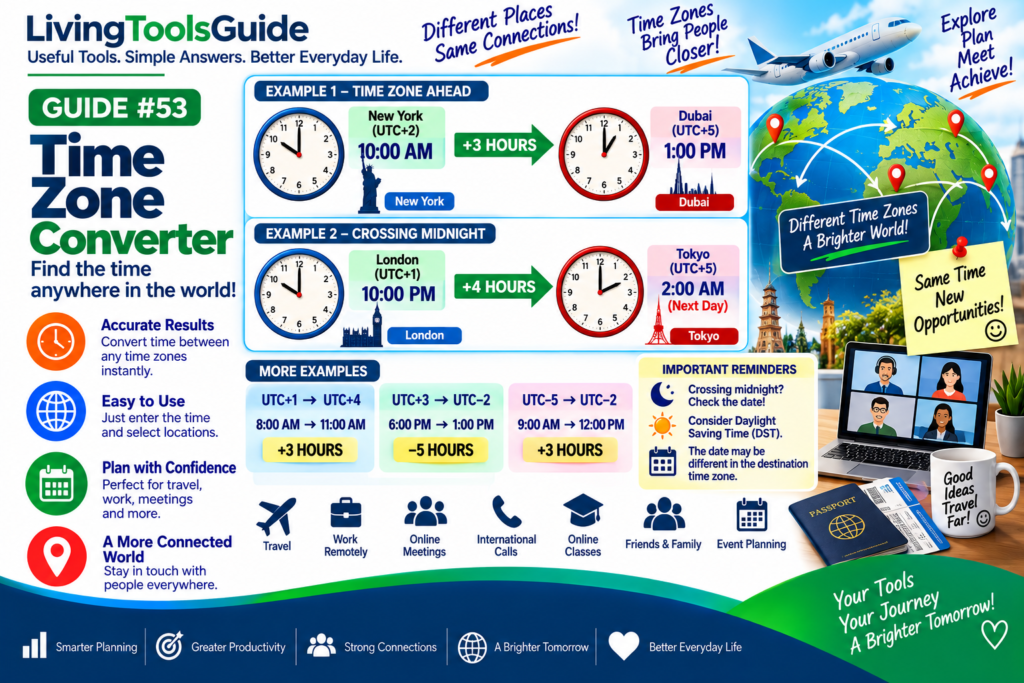
The Time Zone Converter helps you quickly convert time between different locations and time zones around the world.
Time zones allow different parts of the world to keep local time based roughly on their position around the Earth. When you communicate, travel, work, or schedule meetings across countries, the local time at your destination may be several hours ahead of or behind your own.
Calculating these differences manually can sometimes be confusing, especially when the conversion crosses midnight or changes the calendar date.
A Time Zone Converter makes it easier to convert a time from one location to another.
What Is a Time Zone?
A time zone is a region that follows a particular standard time.
The world’s time zones are commonly described using their relationship to UTC — Coordinated Universal Time.
For example:
UTC+2 means the local standard time is 2 hours ahead of UTC.
UTC−5 means the local standard time is 5 hours behind UTC.
These offsets provide a convenient way to calculate differences between locations.
How to Convert Between Time Zones
A simple method is to compare the UTC offsets of the two locations.
You can use:
Destination Time = Starting Time + (Destination UTC Offset − Starting UTC Offset)
For example, suppose the starting zone is:
UTC+2
and the destination zone is:
UTC+5
Calculate the difference:
+5 − (+2) = +3 hours
Therefore:
10:00 AM → 1:00 PM
The destination is three hours ahead.
Example 1 — Converting to a Time Zone Ahead
Starting time:
8:00 AM at UTC+1
Destination:
UTC+4
Difference:
+4 − (+1) = +3 hours
Add three hours:
8:00 AM + 3 hours = 11:00 AM
So the converted time is:
11:00 AM
Example 2 — Converting to a Time Zone Behind
Suppose the starting time is:
6:00 PM at UTC+3
The destination is:
UTC−2
Calculate the difference:
−2 − (+3) = −5 hours
Subtract five hours:
6:00 PM − 5 hours = 1:00 PM
Therefore:
6:00 PM → 1:00 PM
Example 3 — Crossing Midnight
Time-zone conversions can also change the date.
Suppose it is:
10:00 PM at UTC+1
and you want the corresponding time at:
UTC+5
The destination is four hours ahead.
10:00 PM + 4 hours = 2:00 AM
Because the calculation passes midnight, the result is:
2:00 AM on the next day
This date change is important when planning international calls, travel, and online meetings.
For official information about local time, time zones, UTC offsets, and daylight saving time, see the NIST Local Time FAQs.
Quick Time Zone Examples
| Starting Zone | Destination Zone | Starting Time | Converted Time |
|---|---|---|---|
| UTC+1 | UTC+4 | 8:00 AM | 11:00 AM |
| UTC+2 | UTC+5 | 10:00 AM | 1:00 PM |
| UTC+3 | UTC−2 | 6:00 PM | 1:00 PM |
| UTC−5 | UTC−2 | 9:00 AM | 12:00 PM |
| UTC+1 | UTC+5 | 10:00 PM | 2:00 AM next day |
Remember the Date Can Change
When converting time zones, always check whether the calculation crosses midnight.
For example:
11:00 PM + 3 hours = 2:00 AM next day
Going in the opposite direction can produce the previous day:
1:00 AM − 4 hours = 9:00 PM previous day
So a correct conversion may require both a time and date change.
What About Daylight Saving Time?
Some locations change their clocks seasonally for daylight saving time, while others do not.
Because of this, the UTC offset for a particular location can sometimes change during the year.
For real-world scheduling, use the correct time-zone information for the specific location and date, rather than assuming its offset is always the same.
Where Are Time Zone Conversions Useful?
✈️ International travel — understand local arrival and departure times.
💼 Remote work — coordinate with colleagues in different countries.
📞 International calls — choose a convenient time for everyone.
📅 Online meetings — schedule meetings across multiple locations.
🌎 Friends and family — find an appropriate time to contact people abroad.
🎓 Online classes and events — convert scheduled times into your local time.
Why Use a Time Zone Converter?
Manual calculations are manageable for simple fixed offsets, but real-world time-zone conversion can become more complicated because of date changes and seasonal clock rules.
A Time Zone Converter simplifies the process:
Your Time → Select Time Zone → Select Destination → Converted Time
This can help reduce scheduling mistakes when working across locations.
Convert Your Time
Use our Time Zone Converter to convert a time from one time zone to another quickly and easily.